
Apple, and the WebKit team, have recently proposed two different additions to CSS: CSS Transitions and CSS Animations.
The two specifications are confusingly named – and it’s hard to tell what the difference is between them at first glance. However, to put it simply: CSS Transitions are easy to use, while CSS Animations are made for programmers.
CSS Transitions
CSS Transitions provide you with the ability to force CSS property changing to occur smoothly over a period of time, rather than immediately and coarsely.
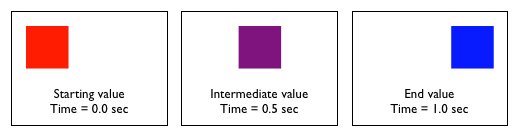
For example if you were to set elem.style.width = "500px";, and its current width was 100px then the element would, normally, jump up to 500px wide. With a CSS Transition it would smoothly move from 100px to 500px – the full CSS required would look something like this:
#elem {
  transition-property: width;
  transition-duration: 1s;
}
This would make it such that any manipulation of that element’s width would be done as a smooth transition. Note that no other properties are listed and, thus, are not affected. You can list as many properties as you wish, in a list: “width, heigh, opacity” (for example).
CSS Transitions complement the existing tools that we have for working with CSS from JavaScript. Any changes to a CSS property still work – they just happen much more smoothly.
Of course transitions can also be injected dynamically from JavaScript, like so:
elem.style.transitionProperty = "width";
elem.style.transitionDuration: "1000ms";
Since you can hook in these custom transitions it makes it possible to use them directly from JavaScript and within frameworks. Which leads to the question: Can the core of JavaScript animation frameworks be replaced with CSS Transitions, if they exist?
We had this discussion recently on the jQuery dev list and one user, Jonah, implemented a quick proof of concept to demonstrate how it CSS Transitions would work within jQuery. He also wrote up a stress test to see how it scaled.
Give the stress test a try in WebKit (or on the iPhone, if you have access to one) and you’ll definitely note an increase in animation smoothness – especially when a large number of animations are being run.
So why not just add in the CSS Transition code today?
There are a large number deal-breaking gotchas:
- You can’t stop an animation that’s already running.
- You get no feedback as to how the animation is running – only an event callback once it has completed.
- There’s no way to synchronize multiple animations.
- There’s no way to specify custom easing functions.
The inability to stop an animation is absolutely killer – and a huge requirement for any JavaScript framework that would be looking to adapt this as part of their code base.
That being said, the current transition code does have its place (namely within iPhone development) so I wouldn’t be surprised to see a solid jQuery plugin popup that iPhone devs start to use.
CSS Animations
CSS Animations are a second proposal from Apple/WebKit that embodies a much-more-complex way of doing animations. To give you an idea of the level of power that’s provided observe this quote from the proposal:
“Many aspects of the animation can be controlled, including how many times the animation iterates, whether or not it alternates between the begin and end values, and whether or not the animation should be running or paused. An animation can also delay its start time.”
The ability to pause animations is crucial – and immediately makes CSS Animations a more-viable candidate for use from JavaScript frameworks.
Here’s an example of how you would set up a CSS Animation, from the proposal:
div {
  animation-name: 'diagonal-slide';
  animation-duration: 5s;
  animation-iteration-count: 10;
}

@keyframes 'diagonal-slide' {
  from {
    left: 0;
    top: 0;
  }
  to {
    left: 100px;
    top: 100px;
  }
}
CSS Animations also provide a greater number of callbacks (letting you know when an animation has started, every step of the animation, and when it has ended) which can be important for doing animation synchronization.
Although the CSS Animation proposal has a number of things going against it:
- Its syntax and usability is far more confusing than that of the, relatively simple, CSS Transitions.
- It includes the concept of keyframes – while I’m sure this might be useful for someone I just can’t see a large enough benefit for such a large feature.
Honestly, at this point, I’d prefer to see CSS Transitions come around, but with a few additions:
- The ability to pause or stop transitions.
- Animation start, step, and end callbacks (along with information about how far along the animation is).
- The ability to provide a custom JavaScript function which would provide a custom easing function.
#1 and #2 are much more important here – but seeing both of those additions would help to make CSS Transitions actually a viable tool for web developers (not to mention that it would provide the best of both worlds – ease of use for non-framework-using developers and power and control for those using frameworks).


Dmitrii 'Mamut' Dimandt (November 11, 2008 at 11:40 am)
I very highly doubt that this belongs in CSS. It should probably make it’s way into DOM or something
John Resig (November 11, 2008 at 12:00 pm)
@Dmitrii: The current solution of having to do all the steps yourself with a full framework is completely not scalable (not only are most solutions large but they don’t scale to a large number of animations). Having this functionality within the CSS engine means that these types of things are now possible. One way or another it’s going to be using the CSS engines to create the animations. Tweaking a CSS property or adding a new set of DOM methods – either way its still going to have to interact with the CSS engine. Thus since CSS doesn’t have any knowledge of the outer DOM it makes sense to keep this contained (or make it an addition to the CSSOM spec). Right now I’m fine with the solution.
lrbabe (November 11, 2008 at 12:05 pm)
@dmitrii:
Where it belongs is actually a good question. What about SMIL when we are talking about animations?
Me (November 11, 2008 at 12:25 pm)
@dmitrii: When you have an interactive layout and animation is part of that, there’s a strong case for having it in the presentation layer.
@John: Was that keyframe comment purely from the javascript framework perspective? I can already imagine several scenarios where this would be quite useful.
Anyway, I’m really looking forward to these becoming widely implemented — with some reservations over the potential annoyance factor. Are transitions still scheduled for Fx 3.1?
Mike Purvis (November 11, 2008 at 12:27 pm)
Philosophically, yeah, it probably belongs elsewhere. But from a practical standpoint, any implementation is relevant to CSS and the rendering engine, so it makes sense to have the two intertwined.
This all started back with a:hover, though. There have been people saying for years that the hover pseudoclass was more behavioury than it was presentationy. In some ways, these animations are more purely presentation than a hover-state, since it’s code that triggers them rather than user interaction.
Maciej Stachowiak (November 11, 2008 at 12:52 pm)
Hi John, thanks for looking closely at CSS transitions and animations! Some feedback on your gotchas:
> 1. You can’t stop an animation that’s already running.
You can, by querying the computed style and setting the inline style to the computed style. Not the most intuitive, but we thought for many UI state transitions you are more likely to want to reverse or change targets, so the design is just based on setting a new style to establish a new target.
> 2. You get no feedback as to how the animation is running – only an event callback once it has completed.
You can get feedback by polling (the computed style updates) but not events for partial progress or anything. Can you describe the use cases for this? It might be a feature worth adding.
> 3. There’s no way to synchronize multiple animations.
The spec doesn’t detail synchronization, in part because the CSS spec is so vague about when style resolution happens. However, the WebKit implementation of transitions will synchronize multiple transitions that are started on the same “event loop” cycle (so if you start two transitions from a single event handler for example, they will stay in sync). HTML5 formalizes the notion of event loop so we may be able to build on that to spec this more formally.
> 4. There’s no way to specify custom easing functions.
There is – you can specify using a cubic bezier curve. In the future we may also propose keyframe-based timing for transitions like we have for animations.
Richard Herrera (November 11, 2008 at 1:12 pm)
John, try this easing function out:
-webkit-transform 250ms cubic-bezier(0.1, 0.25, 0.1, 1.0)
A fellow developer stumbled on those points, which match closely to the iPhone’s default transitions. Still no idea how to plot them on a graph, but maybe it’s a starting point.
Paul Bakaus (November 11, 2008 at 1:58 pm)
@ Maciej:
Is there any plan to create a JavaScript API for all this? It might make things like custom easing transitions much easier for us.
Mario Palomera (November 11, 2008 at 2:47 pm)
Really cool to see that even though this is work in progress it is something actually usable and a better option if your target audience uses Mac/iPhone. Still I don’t know if Webkit for windows supports this technology and makes it hardware accelerated as in the other case.
Tony (November 11, 2008 at 4:55 pm)
John, I am afraid you want to go too deep in integration CSS and JS. E.g. “Animation start, step, and end callbacks” — JS for CSS properties? “The ability to provide a custom JavaScript function which would provide a custom easing function.” — the same. We need to integrate any innovation in technologies very careful and not to go too deep in cross-knowledge between these technologies.
Modern CSS is rather self-sufficient for any current needs.
John Haugeland (November 11, 2008 at 6:26 pm)
“You can’t stop an animation that’s already running.”
Sure you can, just override it. Set the exact same transformation properties anew, and a new animation will begin from the current computed properties.
If you want to stop the animation where it stands currently, you set the new animation length to zero and the target properties to their current computed values. If you want to reset the animation, you set the target values to the original base values. If you want to terminate the animation early, you set the exact same animation in place with a duration of zero.
It’s important that you begin to differentiate between “you cannot” and “I don’t know how”. You’re putting stumbling blocks in your readers’ paths by confusing things you don’t know how to do with things you know cannot be done.
Colin Barrett (November 11, 2008 at 8:41 pm)
“It includes the concept of keyframes – while I’m sure this might be useful for someone I just can’t see a large enough benefit for such a large feature.”
Much of the CSS animation and transition stuff is brought straight in from CoreAnimation, including keyframes. In my CoreAnimation experience, I’ve found them to be super helpful any time you’re doing more than just the most basic of animations.
pd (November 12, 2008 at 12:45 am)
At first glance, the first example CSS declaration for Transitions doesn’t seem to make sense.
Where is the definition for the new width (in this example, 500px)?
kourge (November 12, 2008 at 1:02 am)
@John Haugeland – Is this in the specs? Because if this is a behavior not in the specs, then it is dangerous to rely on. From a quick glance it does not seem to be in the specs.
Chris W. (November 12, 2008 at 11:17 am)
Where do CSS animations end and where does JS take over? If you’ve initiated animation via CSS, how much control do you have over that via JS? How can you view the timeline of animations by looking at CSS files? How does this build on (or change) the importance of semantic CSS? How easy would it be for hackers to exploit since CSS can be easily included across domains?
These are all questions I am asking. I don’t think it’s impossible, and it certainly seems to cut out the “middle man” so to speak. But, there are definitely a lot of intricate details to be worked through. And even then, it could still fail miserably.
Tom Robinson (November 12, 2008 at 8:43 pm)
I suspect you could wrap up all the workarounds Maciej mentioned into a pretty decent animation framework that still gets most of the benefits of “native” animations.
Dmitrii 'Mamut' Dimandt (November 13, 2008 at 5:17 am)
@ lrbabe
SMIL – that’s the term!
@John Reisig
The reason why I expressed my concern over including this in CSS is expressed much more clearly by Tony and Chris W. Were does CSS end and does scripting begin?
Since absolute majority of the time animation effects are initiated by script, it seems to me that it would be better to add a native support for animate (much like browsers are finally adding native support for css-based DOM traversal)
Otherwise we would need to include some sort of CSS Scripting Language [1] [2] to make sure that everything works as we expect it to work :)
[1] http://terrainformatica.com/htmlayout/csss!.whtm
[2] http://terrainformatica.com/htmlayout/csss!-dom-object.whtm
Dmitrii 'Mamut' Dimandt (November 13, 2008 at 5:21 am)
Oh, by the way. I just discovered something
elem.style.transitionProperty = "width";

elem.style.transitionDuration: "1000ms";
Does this imply that the actual transtion will only start after we specify transitionDuration? This seems reasonable at first. This will, however, lead to all sorts of bugs:
elem.style.transitionProperty = "width";

elem.style.transitionDuration: "1000ms";
// will a new transition be triggered after this line?
// since we already have a transitionDuration
elem.style.transitionProperty = "height";
// will this affect height, width or both?
// will this trigger a new transition?
elem.style.transitionDuration: "100ms";
Me (November 13, 2008 at 7:03 am)
@Dmitrii
Multiple properties per element are covered in the spec.
#tdiv {

  transition-property: width, height;

  transition-duration: 1s, 100ms;

}
#tdiv:hover {
/* Trigger height transition */
height: 100px;
}
// trigger width transition

var e = document.getElementById ('tdiv');

e.style.width = '600px';
Dmitrii 'Mamut' Dimandt (November 13, 2008 at 9:11 am)
@Me
This means that in order to change/add a transition I need to do the following:
– get the element
– get its transtion property
– parse out all of it’s transitions
– see if a transition is already there
— if it’s there, build a new string with new values for both the transition and its timing
— if it’s not there, append a new string with the transition and its timing
– trigger the transition somehow (will e.style.width = ‘600px’ trigger just width or the entire transition?)
compare this to
$('#tdiv').animate({width: 0, height: 0}, 1000);
Instead of blowing up an already monstrous CSS-spec why not implement a native animate function?
Dmitrii 'Mamut' Dimandt (November 13, 2008 at 9:14 am)
P.S. I like the idea of animations and keyframes though :)
Me (November 13, 2008 at 9:25 am)
@Dmitrii
I understand what you’re saying, however it’s not difficult to wrap it in an object…
http://pastebin.com/f122d343
I’m sure someone better at javascript than myself can do it in fewer lines of code.
Dmitrii 'Mamut' Dimandt (November 13, 2008 at 9:47 am)
@Me
I still don’t get it :)
e.style.transitionDuration = dur.join (', ');
if (typeof o == 'object')
// ({width: '50px', height: '200px'})
for (var p in o)
e.style[p] = o[p];
When will the actual transition be triggered? Once the first e.style[p] is applied? And it will be triggered separately for each transition property?
Me (November 13, 2008 at 10:12 am)
@Dmitrii
I’m going at this quite blind (testing in Fx 3) so apologies if I’m getting something very wrong. It is something I’ve been meaning to look at — I’ll test properly in a webkit build this evening.
But yeah, I _assume_ it’ll be triggered separately for each property upon modification. Consider it a feature rather than a bug ;) The difference in timing when triggering multiple transitions from a tight loop should be miniscule, at least I’m not convinced it’d be visually noticeable.
PS: This fixes an error in script linked from my last post…
http://pastebin.com/ff045a79
Dmitrii 'Mamut' Dimandt (November 13, 2008 at 10:13 am)
@Me
ok. Thank you for all your trouble
Ivan (November 13, 2008 at 11:17 am)
Interesting ideas, but I don’t understand why you need callbacks from css. Wouldn’t animation styles simply have a “running” property which could accept start/stop as values? The js framework would set stop, and then query for the rest of the values. The css rendering engine would keep going provided the animation style wasn’t set to stop.
Me (November 13, 2008 at 2:36 pm)
I’ve had a quick play with this using the code I paste-bin’d above.
-webkit-transition-* properties are seemingly not propogated to DOM from inline CSS although I can set them.
#tdiv { -webkit-transition-property: width }

/* */

alert (elem.style.WebKitTransitionProperty); // undefined, expecting string
I also can’t transition between absolute positions from the DOM although these trigger fine via CSS hover.
Testing against Gtk WebKit-r38297, saw nothing about either of these on WebKit bugzilla. Alas, I’ve no account or particular desire to create one.
Xavier (January 12, 2009 at 2:55 pm)
Hello
This give me some ideas.
Thanks.
// Original code from: http://www.parkerfox.co.uk/labs/css-webkit-animation-jquery-proof-of-concept.html
// http://www.the-art-of-web.com/css/timing-function/
// http://ejohn.org/blog/css-animations-and-javascript/
(function($)
{
$.fn.cssTransition = function( css, speed, ease, callback ) //styles, duration, easing, callback
{
if( navigator.userAgent.indexOf('WebKit')>-1 ) // $.browser.safari ||
{
// Differentiate 0 from null
if(speed === 0)
{
this.css(css);
window.setTimeout(fn, 0);
}
else
{
//ease = ease ? ease : 'ease-in' ;
// If ease is a function "ease" is the "callback"
if( typeof(ease)==='function' && ! callback ) callback = ease ; //typeof(callback)==='function'
var
transKey = [] ,
transCss = {} ,
classicCss = {} ;
// Parse sented css
for( var i in css )
{
// Keep css for the classic animate
switch( i )
{
// Allowed keys for webKit
case 'undefined': break ;
case 'width' :
case 'height' :
case 'rotate' :
case 'opacity' :
case 'top' :
case 'left' : transKey.push(i) ;
transCss[i]=css[i] ;
break ;
// Save others keys for a standard jQuery animation
default : classicCss[i]=css[i] ;
}
};
// Preserve speed to be a number
switch( speed )
{
case 'slow' : speed= $.fx.speeds.slow ; break ;// 600,
case 'fast' : speed= $.fx.speeds.fast ; break ;// 200,
case 'normal' : speed= $.fx.speeds.def ; break ;// 400
};
// easing
if( typeof( ease==='string' ) ) ease = 'ease-in' ;
switch( ease )
{
case 'default' : case 'linear' : case 'ease-in' : case 'ease-out' : case 'ease-in-out' : case 'cubic-bezier' : break ;
default : 'ease-in'
};
// Apply WebKit transition css
this.css({ webkitTransitionProperty:transKey.join(', '), webkitTransitionDuration:speed+ 'ms', webkitTransitionTiming:ease }) ;
// have to wait for the above CSS to get applied
window.setTimeout( function(x,y){ x.css(y) }, 0, this, transCss ) ;
window.setTimeout( callback, speed ) ;
// Apply classic css
if( classicCss.length!=0 ) this.animate( classicCss, speed, ease, callback ) ;
};
}
else
{
this.animate( css, speed, ease, callback );
};
}
})(jQuery);
Matt Sherman (April 28, 2009 at 9:07 pm)
John, it seems like you might be able to work around objections #1 (start/stop) and #2 (progress callbacks).
Say that jQuery were going to animate from 0% to 50% opacity. In the current implementation, you’d do (say) 50 increments of 1% each.
Using CSS Transitions, perhaps jQuery could iterate over 10 transitions of 5% each. You’d be able to stop or get a callback at any of those 10 points. In theory, you’d have cut down your DOM-based redraws by 80%.
Seems like a workable compromise that would be beneficial in a lot of use cases. Let it be configurable, so the minority that needs more precise control could reduce the increments or fall back to the “classic” behavior.